

The most anticipated WordPress release, WordPress 7.0, was released on May 20, 2026. Moreover, WordPress 7.0 has been named after the famous Jazz musician Louis Armstrong.
The crucial feature, real-time collaboration (RTC), has been postponed and will likely be launched in a future release. Marked by Native AI integration, WordPress 7.0 is a breathtaking initiative in the content management system’s history.
WordPress 7.0 offers users a wide range of exciting features and improvements, including enhanced workflows, the latest block editor tools, collaboration features, and more.
If you manage a small or large business that massively depends on WordPress, you must understand what the WordPress 7.0 release brings to your business in terms of growth and future opportunities.
Four Building Blocks Form The Foundation Of WordPress AI
WordPress 7.0 launches four foundational building blocks that help create its native AI architecture. WordPress is working hard to build the infrastructure for a future in which AI becomes part of how the CMS operates.
These four WordPress 7.0 AI building blocks are:
* WP AI Client
* Client-Side Abilities API
* AI Connectors Screen
* Connectors API
These four features condone a radical transformation in how information is published and how they help design websites. The huge global developer community can work on new ideas when developing themes, exploring new ways to craft websites, examining data, and making it easier to build a digital business. No other CMS has that level of people power behind it.
Release Schedule
| November 12, 2025 | Alpha Begins. Trunk is open for business (Slack archive). |
| 19 February 2026 | Beta 1. From this point on, core contributors will focus on testing and fixing bugs discovered during beta testing. Begin writing Dev Notes and the About page. |
| 26 February 2026 | Beta 2. Test the beta release, fix bugs discovered during beta testing, and continue writing Dev Notes and the About page. |
| 5 March 2026 | Beta 3. Test the beta release, fix bugs discovered during beta testing, and continue writing Dev Notes and the About page |
| 12 March 2026 | Beta 4. Test the beta release, fix bugs discovered during beta testing, and continue writing Dev Notes and the About page. |
| 19 March 2026 | Publish the Field Guide with Dev Notes, commit the About page, begin drafting the release post, hard string freeze, and branch for the release. Begin to collect nominations for the 7.1 release squad. |
| 2 April 2026 (Delayed) | Release Candidate 3. Update the images on the About page and continue drafting the release post. |
| 8 April 2026 (Delayed) | Dry run for release of WordPress 7.0 and 24-hour code freeze (Slack archive). |
| 9 April 2026 (Delayed) | WordPress 7.0 has been released |
| 8 May 2026 | Release Candidate 3. (in name, but test as a “new Beta 1”) |
| 14 May 2026 | Release Candidate 4. (in name, but acting as a “new RC1”) |
| 19 May 2026 | Release Candidate 5. |
| 19 May 2026 | Dry run for release of WordPress 7.0 and 24-hour code freeze. |
| 20 May 2026 | WordPress 7.0 has been released. |
Source: WordPress 7.0 Development Cycle
What’s New in WordPress 7.0?
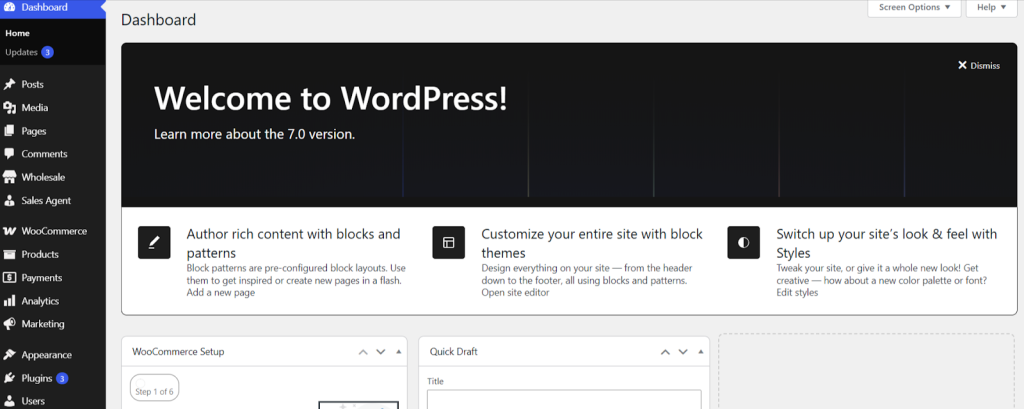
WordPress 7.0, the imminent release, prioritizes “Workflows”. As a result, designers, editors, and writers can easily work in one place. Besides, WordPress 7.0 aims to integrate third-party collaboration tools such as Google Docs, Trello, Slack, and others into the dashboard.
That said, writers, developers, and other professionals should remember that the WordPress 7.0 release date is May 20, 2026.
What WordPress 7.0 Offers to Developers
As a developer, you should know that WordPress 7.0 is scheduled for release on May 20, 2026. Regarding the benefits, WordPress 7.0 offers to Plugin and theme developers, the advanced infrastructure and the Abilities API empower plugin developers to register their plugins’ capabilities. Doing so will help AI assistants to recognize and utilize them when needed.
Likewise, theme developers can leverage block theme patterns rather than develop new themes. They can also use the expanded Style Variations system for customization needs.
Enhanced Notes
When you use the editor, a comprehensive commenting system lets you comment on or leave notes on specific blocks. To avail this feature, you should open any Post or Page using the block editor and press the Paragraph block to choose it.
Now click Add Note, select the user, and add your note. After saving the post, you can view the note. Thus, you can leverage this feature.
Responsive Editing Mode

Users can smartly showcase or hide blocks depending on screen size when they use the editor. In this scenario, a responsive editing mode helps them hide or showcase the particular block on desktop or mobile.
Pattern Editing, Spotlight, and Isolated Editor Mode

WordPress 7.0 lets you use patterns with Spotlight mode. You can use this Spotlight mode to glorify a single piece of content. Moreover, the Isolated Editor lets you modify synced patterns and template parts.
Block Design Tools
You can benefit from multiple block design tools available in WordPress 7.0, the upcoming version of WordPress. They include controls for aspect ratio in full images, text line indent, and text column support. Likewise, they can use dimension presets for spacing needs.
Heading Block as Block Variations
When using WordPress 7.0, you will realize that different heading levels (H1-H6) are shown as Block Variations. Hence, you can effortlessly include “Heading 3” using the block inserter directly, with its default attributes, style, and icon.
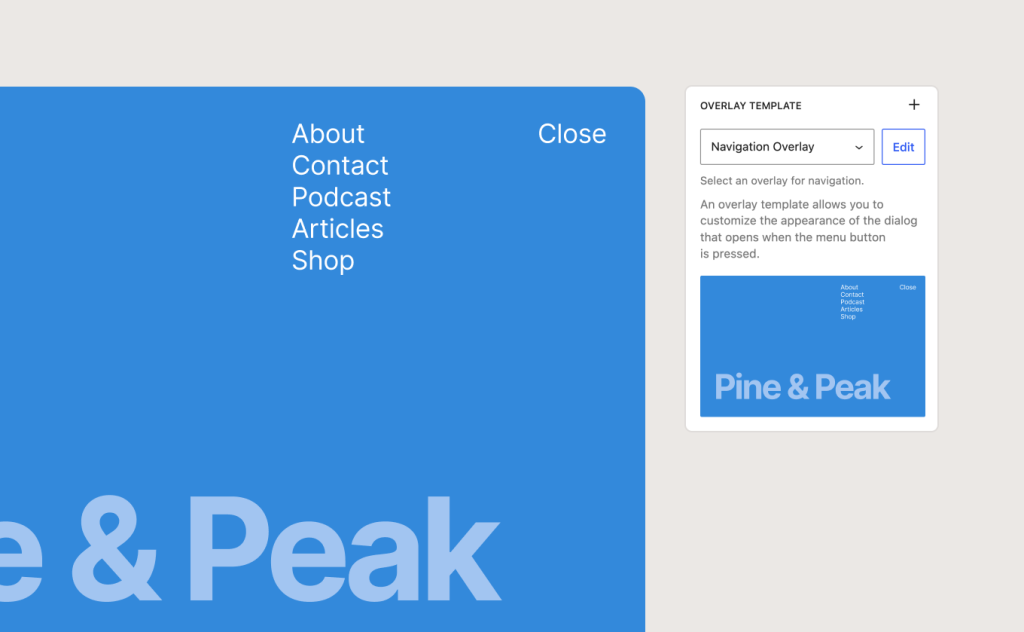
Create and Customize Menu Overlay
You can easily create and optimize a menu overlay using patterns and blocks. Likewise, you can incorporate stylized typography and columns. Additionally, embedding your close button in the overlay is a reality. In short, you can develop your own menu or follow a template.
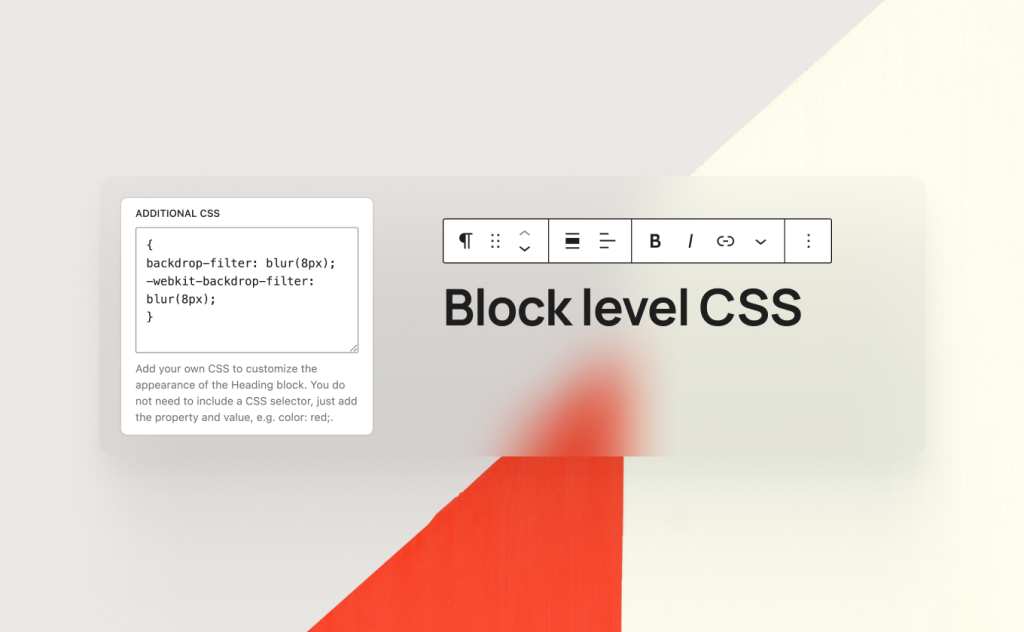
Optimize Your Content with Block-Level CSS
You can easily optimize every content detail with custom CSS at the block level in your post or page.
Real-Time Collaboration
This feature was supposed to be launched in WordPress 7.0. However, it has been discarded from the latest release. That said, the real-time collaboration feature will be launched in a future WordPress release.
Modern Admin Redesign (DataViews)
In previous versions and updates of WordPress, the admin dashboard remained the same. Thanks to WordPress 7.0, users can experience a powerful, advanced admin dashboard. With DataViews, they can easily replace old WP List Tables with an optimized, app-like interface.
As for DataViews, they empower users with features such as inline filtering without page reloads, consistent spacing, etc. Users can also benefit from classic admin panels and the block editor.
Same Default Theme
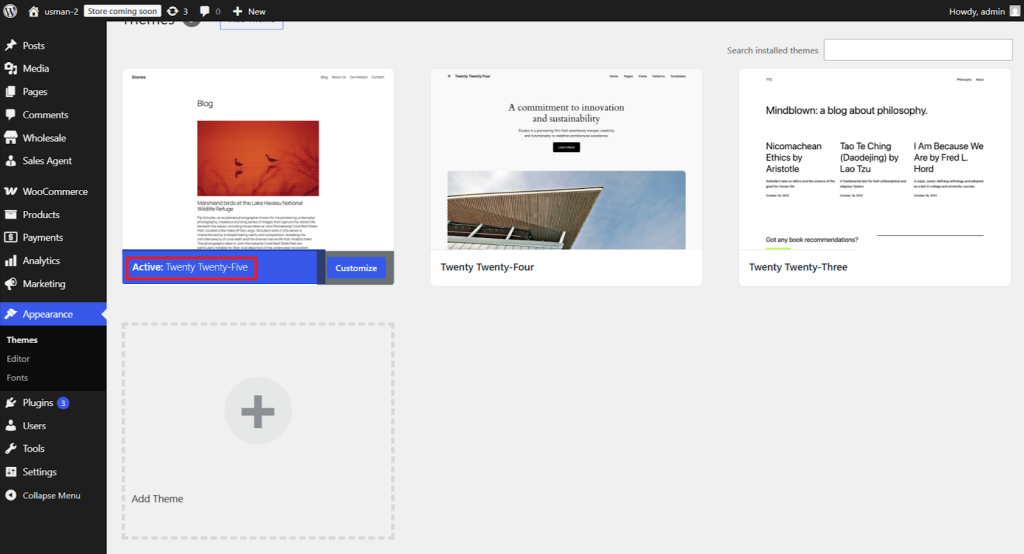
The WordPress 7.0 release does not comprise a new default theme, for instance, a “Twenty Twenty-Six” theme. That said, the upcoming release of WordPress has ensured that the existing WordPress block theme will remain impactful and continue to grab users’ attention.
The Abilities API and AI Client
WordPress 7.0 has created an infrastructure that helps AI work efficiently within the CMS. In this situation, the advanced Abilities API primarily serves as a bridge, enabling AI services to understand what a specific WordPress site can do. Thus, plugin developers can build a wide range of AI features that remain consistent across the entire platform.

If you use AI to generate alt text for images, simplify content workflows, or suggest SEO improvements, these tools can integrate with WordPress core.
Media Processing in the Browser
WordPress 7.0 includes client-side media processing, enabling users to leverage the browser’s capabilities and smartly handle tasks such as image resizing and compression. This way, users can use advanced image formats and compression techniques to decrease the load on the web server.
WordPress 7.0 RC 4
For technical issues that have been addressed since RC3, you can go through the following links:
- Closed 7.0 WordPress Core Trac tickets since May 8, 2026
- 7.0 Gutenberg commits since May 8, 2026
WordPress 7.0 RC 3
RC2 includes over 140 issues since the RC1 release. For technical information that relates to such issues, browse the link below:
- Closed 7.0 WordPress Core Trac tickets since March 26, 2026
- 7.0 Gutenberg commits since March 26, 2026
WordPress 7.0 RC 2
For technical information related to issues addressed since RC1, you can browse the following links:
- GitHub commits since March 24, 2026
- Closed Trac tickets since March 24, 2026
WordPress 7.0 RC 1
RC1 includes more than 134 fixes and updates since the Beta 5 release.
WordPress 7.0 Beta 5
WordPress 7.0 Beta 5 contains over 101 fixes and updates since the Beta 3 release.
WordPress 7.0 Beta 5 New Feature (Command Palette Shortcut)

You can easily use all the tools you require with a single click using the new Command Palette shortcut in the Omnibar. In WordPress version 7.0 Beta 5, logged-in editors can see a field in the upper admin bar with a ⌘K (on Mac) or Ctrl+K (on Windows) symbol that, when clicked, opens the command palette.
The new command palette entry point streamlines navigation and customization, providing you with complete control from anywhere on your website – whether you design, edit, or browse plugins.
WordPress 7.0 Beta 4
WordPress 7.0 Beta 4 includes 10 security patches, along with more than 49 updates and fixes since the Beta 3 release. There are 14 updates in the Editor and 14 in Core.
WordPress 7.0 Beta 3
WordPress 7.0 Beta 3 contains 148 updates and fixes since Beta 2. There are 70 updates in the Editor and 78 updates in Core.
WordPress 7.0 Beta 2
WordPress Beta 2 has more than 70 updates and fixes throughout the Core and Editor since the Beta 1 release.
Connectors UI
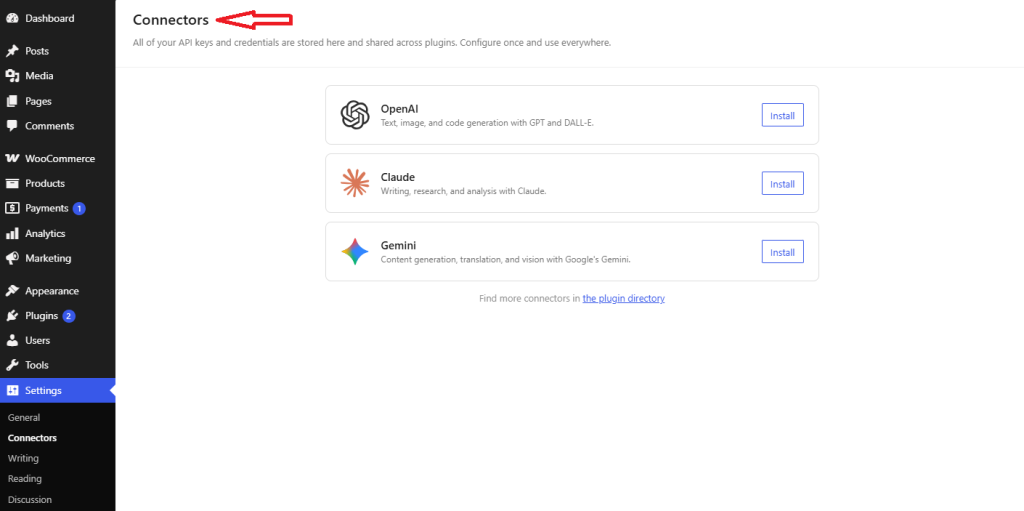
The Connectors UI dashboard is a new feature WordPress 7.0 offers to its users. The dashboard helps users manage multiple external AI connections under one roof.
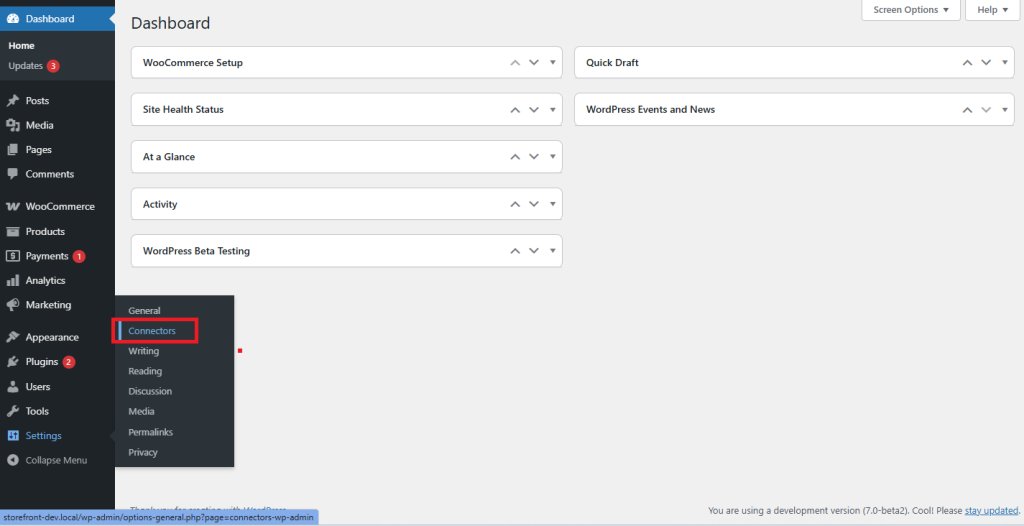
They can test this new UI in WP-Admin under Settings > Connectors. Thus, users can add, remove, and update outside connections.
WordPress 7.0 Beta 1
WordPress 7.0 Beta is available for downloading and testing.
How to Test WordPress 7.0 Beta 1?
To examine WordPress 7.0 Beta 1, you can use various methods. For example, you can install and enable the WordPress Beta Tester plugin on your WordPress website. You can then choose the “Bleeding edge” channel and “Beta/RC Only” stream.
Furthermore, you can download the Beta 1 version (zip) and install it on the WordPress site. Additionally, you can use the WP-CLI command: wp core update –version=7.0-beta1. Similarly, the WordPress 7.0 Beta 1 WordPress Playground instance is available, allowing you to test the software in your browser.
Wrapping Up
The latest version of WordPress, WordPress 7.0 “Armstrong”, was officially released on May 20, 2026. The release primarily focuses on collaboration and infrastructure. Furthermore, it ensures that the prominent content management system can keep pace with other platforms, both existing and potential.