

Do you want a professional email address but don’t want to pay for it? The good news is that a wide range of platforms offer free domain names and email hosting, so you can use their services without spending a penny.
This blog post explains how to get an email domain for your business without spending money.
Why is a Professional Email Domain Crucial?
Compared to generic email addresses, a custom domain ties every message to your business. This is especially handy in competitive industries where gaining a competitive edge matters.
A professional email domain offers much-needed authority and credibility that generic email services like Yahoo or Gmail lack.
Custom domains are hosted on secure servers with advanced encryption and anti-spam protections. This helps decrease the risk of phishing attacks or unauthorized access.
A professional email domain also helps with brand recognition. Every email you send is an indirect opportunity to reinforce your business name and identity.
What are Free Email Domain Options?
Fortunately, free email domain options are widely available, giving individuals and small businesses a simple way to set up an online communication channel at no extra cost.
Several free email services, such as Yahoo, Gmail, and Outlook, offer standard email accounts (e.g., user@gmail.com); a custom email domain (e.g., user@yourdomain.com) usually requires a paid service or domain registration.
That said, some providers, Neo Mail, Zoho, and Yandex, offer free email hosting with a custom domain. These free email services offer mobile apps so that users can access email on the go.
They also let users link multiple accounts so that they can manage communications from a single platform. This makes them suitable for those with several email accounts.
How to Get a Free Email Domain for Your Business: 2 Easy Ways
A free email domain helps improve a business’s professional image by aligning its email address with its brand. Here are two simple methods to attain one:
1- Using Free Hosting Providers
Free hosting services are great for small businesses or users who want to create a website without spending much money.
These hosting companies often include free email services in their packages. As a result, you can create professional email addresses that showcase and use your site’s name to start and market your brand with a custom domain.
This service comes in a combo and is a budget-friendly option that helps users manage web and email hosting together. This makes it easy for users to control their online accounts.
2- Using Free Email Services
Businesses and individuals often benefit from free email services, such as Gmail, Tutanota, and Outlook. These services primarily work as professional communication tools at no upfront cost.
They also offer user-friendly interfaces, ample storage, and strong spam filters, making them reliable for daily communication.
3 Additional Methods to Get an Email Domain for Your Business
Beyond these helpful methods, you can spend a few bucks to get an email domain for your business without any hassle.
1- Using an All-in-One Website Builder
All-in-one website builders offer an impressive email domain option, giving users comprehensive solutions for creating, handling, and even expanding an online presence.
These site builders or platforms include custom email domains in their subscription packages. This lets users create the branded email addresses they want. Moreover, this integration helps streamline the process of orchestrating a professional online identity.
2- Exploring Domain Registrars with Free Email Offers
Various domain registrars offer email hosting alongside their domain name hosting packages at no extra cost. This works well for small businesses and startups since professional email is a necessity and costs no extra.
For example, with Proton Mail, you can get an email address, 15 GB of storage, and spam protection when you buy the domain for just $3.99/month, which is relatively economical for new users.
3- Using Premium Email Services
Fortunately, entrepreneurs, startups, and small businesses can use premium email services like Google Workspace or Microsoft 365. This helps them secure custom email domains and elevate their brands with advanced features.
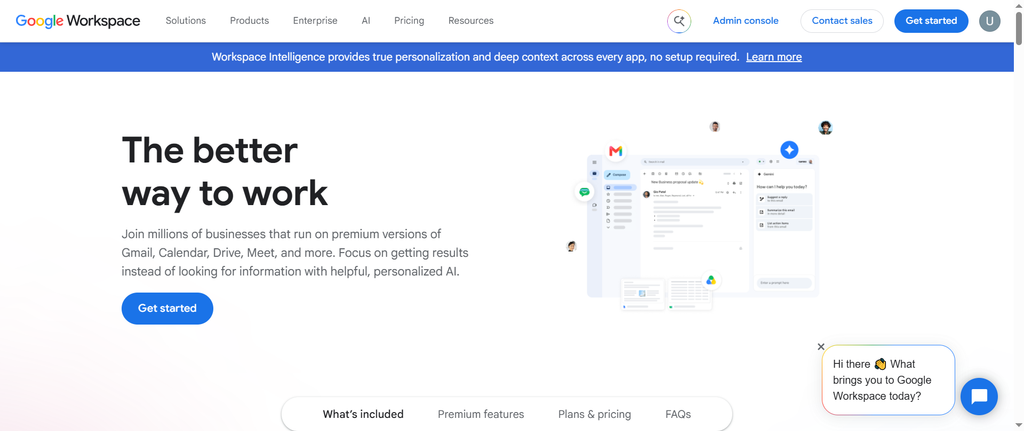
Through these services, they can get secure, scalable, feature-rich email hosting solutions that offer more than basic functionality. For instance, businesses can benefit from robust data encryption, shared calendars, integrated video conferencing, and more.
It is a better, more reliable option, especially given the importance of custom email domains in building brand identity and goodwill over the long run. Therefore, modernizing startups and small businesses through unique, customized email domains is a necessity in this AI-driven era.
Moreover, they should consider using high-quality, results-driven email marketing services to improve the effectiveness of their custom email domains. This will strengthen customer relationships and improve future conversions.
How to Get a Free Email Domain with Hostinger?
Luckily, Hostinger helps users get a free email domain for new or existing businesses. To acquire a free email domain for your business, follow the steps provided below:
- Follow Hostinger’s sign-up process to register a new domain.
- After you log in to your Hostinger dashboard, go to the email section.
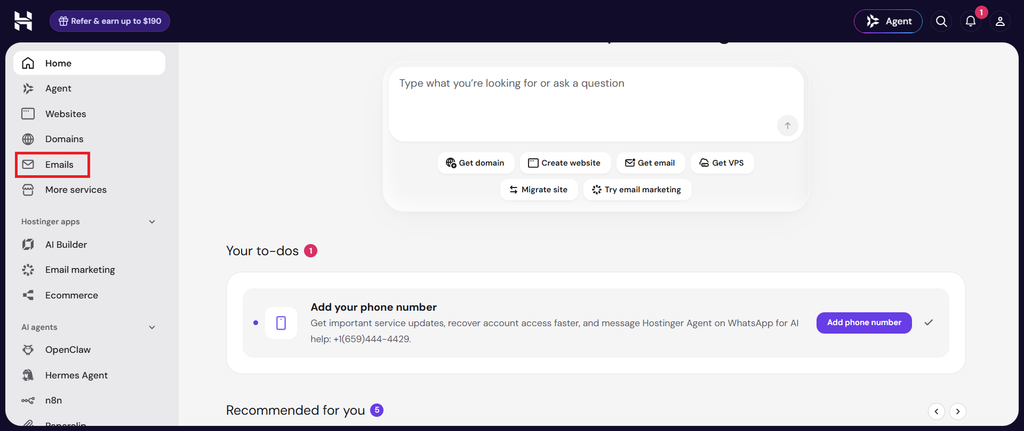
- Press Start Free (first-time setup) or Claim free email (for additional domains).

- Select/enter the domain, then hit Confirm.
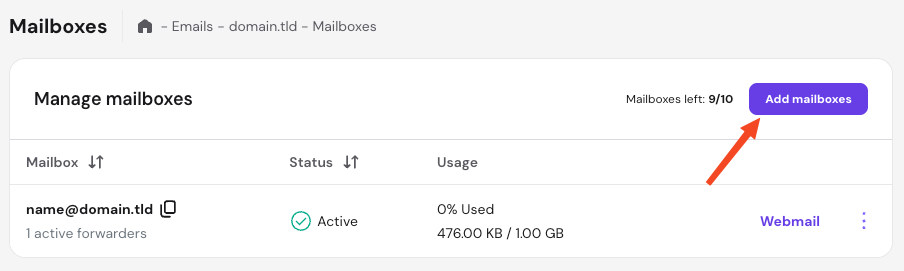
- After you activate the plan, go to Mailboxes > Add mailboxes.
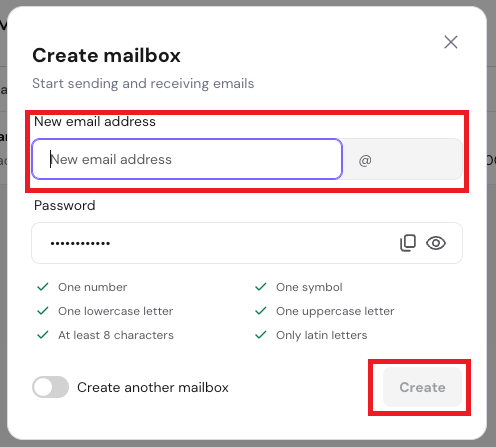
- Enter the email name and password, then click Create.
- Access an email domain through Hostinger Webmail or connect to an external client.
That’s how you can obtain a free email domain for your business.
How to Get a Free Business Email Domain with Bluehost?
If you want to get a free business email for your business, here is what you should do:
- Follow Bluehost’s sign-up process to create your account.
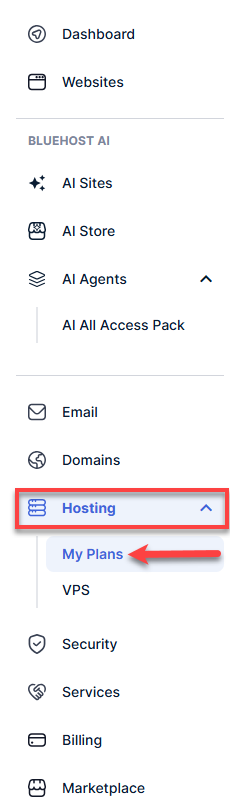
- Log in to your Bluehost portal, click Hosting > My Plans.
- Press the cPanel email button.

- Press Email Accounts > Continue when you see the pop-up.

- Click the +Create option.
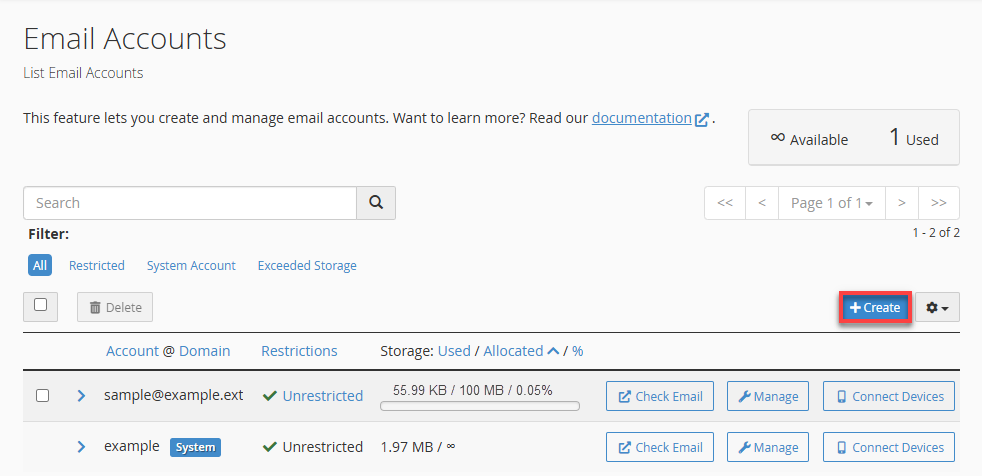
- Enter the Domain, Username, and Password.
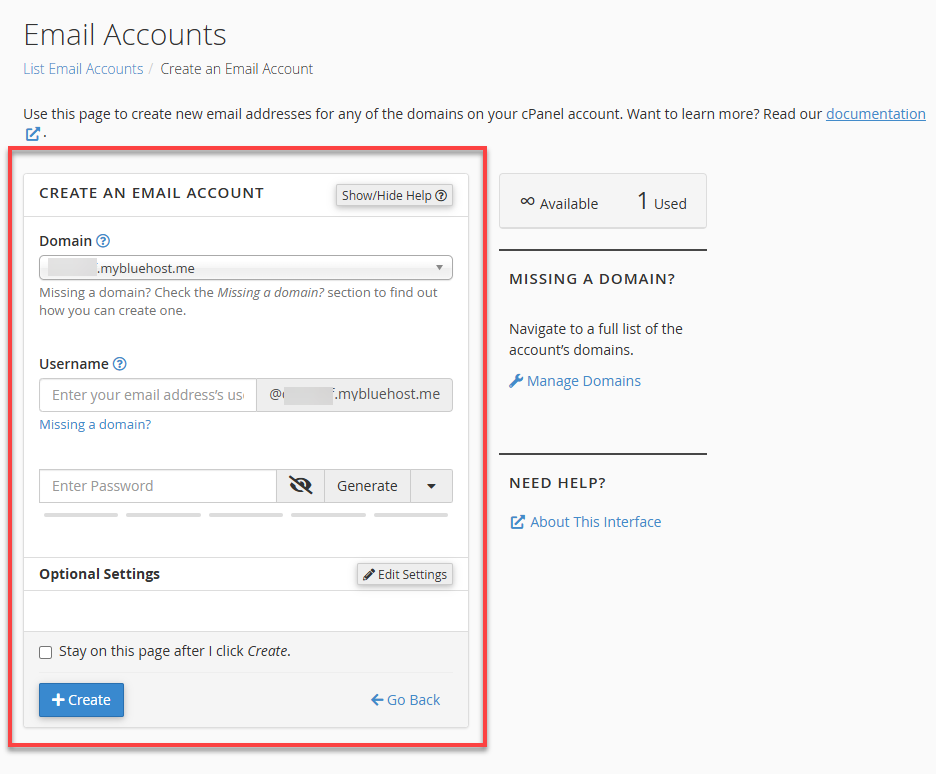
- Click Edit Settings to update storage. (Remember, it is an optional step)
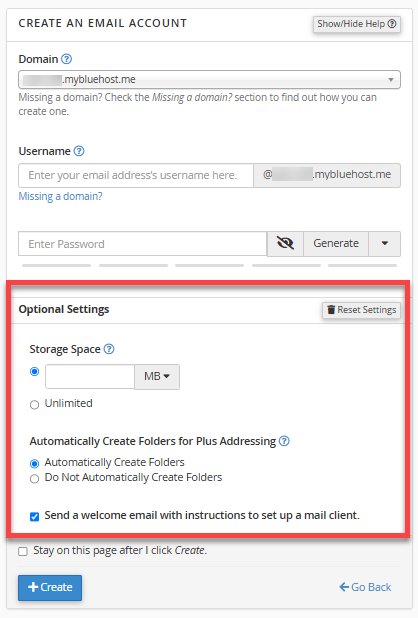
- Click +Create to complete the process.
- Access Webmail through Check Email > Open (RoundCube Interface).

By following the steps above, you can easily get a free email domain for your business.
Wrapping Up
We hope you’ll appreciate our blog post on getting a free email domain for your business. A personal email address doesn’t impress current or potential customers.
On the contrary, you may not want to pay extra for a professional email domain. However, free options have caveats, but you still have choices.
In this blog post, we highlight the importance of a free email domain and explain five ways to get a free email domain and account.
FAQs
What is a business email?
A business email uses your domain name rather than a generic provider. Instead of yourbrand@gmail.com, it shows you@yourdomain.com. This shows professionalism and signals that you run an established business.
What does a free business email include?
Free business emails offer basic options like an inbox, limited storage, and simple spam filtering. Users can send and receive messages to communicate and contact customers.
Can I use Gmail or Outlook for my business email?
You should avoid using Outlook or Gmail for your business email, as it doesn’t look professional and hampers your brand’s reputation. A custom email domain helps enhance credibility and professionalism.
Can I use free business email for many users?
Free email domain options have limitations. They rarely support many users. If businesses start with free email domain packages, they usually switch to premium plans because freemium plans often come with shared inboxes and limited admin controls.
How can I choose a professional email address?
You can follow different tips to choose a professional email address. For instance, your email address should start with info@, hello@, support@, etc. Your email address should be easy for users to remember.
They should not get confused while typing your email address. It must match your brand, and you should use different email addresses for distinct functions like sales, marketing, finance, customer support, IT, HR, etc.